Sunday, 3 May 2015

Configuring Centos with a DHCP Reservation

Sigh.. I'm sure I struggled with this the last time I had to do it. Hence I am writing a little note for next time!

The scenario:

  • Windows 2003 Server running a DHCP server
  • Centos 6.4 VM I want to automatically allocate a static address to. Essentially I don't want to hard-code the IP address/DNS server addresses in the VM's config. I want it to get these automatically from DHCP but as the VM will act as a server I need the IP to be static and for the machine to be locatable via DNS.
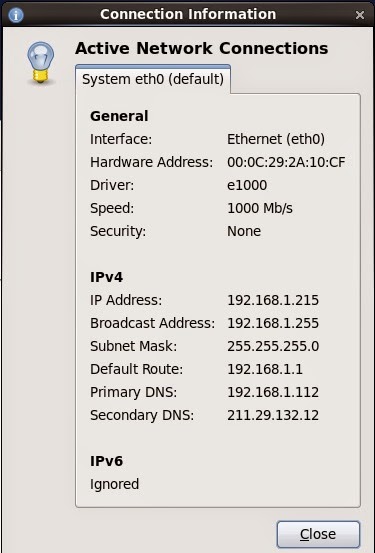
So initially Centos is installed and the machine boots with whatever default address got allocated to it. Right click the connection icon at the top left of the screen and choose Connection Information. You will get this screen:

Select and copy the hardware address. Logon to the windows 2003 machine where the DHCP server is running and run the DHCP configuration tool for Administrative Tools.

Open the scope, right click reservations and add a reservation like this (sorry I blotted out the domain name).


Paste in the hardware address and delete the colons (:).

The description doesn't matter. Leave the DNS settings as default.

Now go back to centos, right click the connection icon, choose Edit Connections, select the  System Eth0 connection and click edit.

For some reason when  I first installed the system, the network interface was configured NOT to start at boot time. This is pretty annoying as you have to connect to the console to get the machine running. Set it to connect automatically

Initially I thought I had to set the DHCP client ID. After many reboots I figured out if I set this it wouldn't work! If I just set it to blank the DHCP server gives the machine the right address and we are all good. Apply the changes, enter your root password and let it save.

In the Windows DHCP config tool, find the current reservation for the machine, right click and select delete. If you really want to be sure restart the DHCP server (right click the node below DHCP, choose All Tasks and restart). Then in Centos click the network icon, click System eth0, wait for the spinning to stop and then check the connection settings again. It now should have the configured IP.

Then I found that for whatever reason the DNS still doesn't automatically get this new entry even though the DHCP server is supposed to update it.

On Windows 2003 server, open the DNS management tool from Administrative tools, open the forward lookup zone and open your zone. Right click and choose New Host (A). Enter the name of the host (just the short part so centosdev in my case). Enter the IP address. I left the 'Create associated pointer (PTR) record checked but I got an error when I hit add host saying it couldn't. It still works so I'm not worried. This is probably because I am running on a non-routable address range.

My client computer (i.e. the computer I am accessing the centos server with) is a Windows 7 machine. I did a ipconfig /renew and then I was able to ping the new computer by name and I was able to access it via VNC.

Wednesday, 29 April 2015

Lab Power Supply - Pre-regulator

So I did some more work on the design of the pre-regulator circuit to try and increase the maximum voltage on the bulk capacitor. I also breadboarded part of the line synchronous ramp circuit which lead to a curios surprise.

The Problem with Voltage Doublers

So I got the comparators in the mail from RS and decided I would build the circuit that detects when the AC voltage goes to near zero. I haven't added the output diode, resistor and capacitor but just looked at the comparator output on the scope.


The circuit basically works except that I found there was a problem with the AC signals. Here is how it looked on the scope.


The blue and red traces are the AC1 and AC2 lines coming in. The yellow trace is the output of the comparator. As you can see it is going low when both AC signals are within one diode drop of zero (as it should) however what happened to the AC signals? They shouldn't be overlapping!

I checked the phasing of the transformer windings, and scratched my head for a while.

Eventually I decided it must have something to do with the voltage double. I removed the voltage doubler circuit and temporarily connected the gate bias regulator to the output of the capacitor (so the MOSFET gate and op amps are running at 36V generated off the main capacitor). Now the traces look as I expect!


(The green trace is the output voltage AC coupled).

I experimented with a couple more voltage doubler circuits and I emailed Peter Oakes who was extremely helpful. He had a very good idea which is instead of trying to generate the gate bias using a voltage doubler I could add another winding to the transformer. The transformers are toroidal so this is a relatively straight forward process.

I haven't tried this but will report back when I do!

Pre-regulator design

The problem with the pre-regulator is that I can't seem to get the voltage above around 33V (or the bottom of the ripple at 3A much above 30). This might be Ok but when I switch to the 15V configuration at 5A I would be lucky to get 10V out of the system.

My thought was that it was to do with the SCR drop or the SCR turning on late. I thought if I could replace it with a MOSFET transistor that is fully saturated it would work better.

I tried using the SCR to generate the voltage for the MOSFET and while I got this to work (in simulation) it had the same problem. I figured the SCR was still the limiter.

If I just drive the MOSFET from the comparator then what happens is the MOSFET will switch on and off as the voltage rises above and falls below the ramp. This will generate considerable noise and dissipate lots of power so this is no good. What I need is something that turns the MOSFET on when the firing point is reached and doesn't turn it off again until the AC reaches its zero point.

I was even considering implementing this with digital logic but thought it should be possible to do using transistors. I thought if I configure an NPN and a PNP to latch-up like an SCR does I can trigger this latch from the comparator. Then I can reset the latch using the output of the line-sync comparator which pulls low when the AC goes to zero.

The circuit I came up with was this:


So when the Fire signal goes high, it turns on Q2 which starts drawing current through Q3's base. This causes a current to flow through R2 so even when the Fire signal goes low it keeps conducting and stays latched. I had to add a diode between the Fire signal and Q2's base as otherwise it would turn the latch off. The current flowing through Q2 means the voltage at Q2's emitter goes up and it is the emitter that will drive the MOSFET gate.

Then to turn the latch off the Zero signal pulls Q1's base low which turns off Q3 and which in turn turns off Q2 and pulls the emitter low. Pretty cool huh?

I set the Fire signal to go high at the 90ms mark and then go low again at 100ms. I set the Zero signal to start high and go low at 150ms and then go high again.

Here are the traces of Zero and Fire signals:


Here they are again with the output signal superimposed:

As you can see the output starts high (don't think this matters), goes low when the zero signal goes low and then goes high again when the fire signal goes high. It stays hight until the Zero signal goes low again. This is pretty much what I wanted.

So I integrated this into the pre-regulator circuit (sorry its a bit ugly)


And actually it doesn't work that well! First of all, when the MOSFET turns on it charges the capacitor quite fast which means the output is quite peaky. I'm not sure why the op amp isn't adjusting the firing angle later but I think it just charges too fast.


In the trace above the capacitor voltage is green, the AC inputs are blue and red, the light blue ( V(n012) is the firing signal from U1. You can see it fires late the first couple of times and then earlier which over-charges the capacitor so then it doesn't fire again until much later and so on. Very chaotic.

The second thing is that when I set the desired output to max, the capacitor voltage is still too low!


Ok so at this point I'm a bit stumped. I tried increasing the gate bias voltage but this doesn't change much. I tried going back to the SCR design and replacing two of the diodes in the bridge rectifier with SCRs. This did help a bit but not much.

I had a thought however and that is the pre-regulator is only really useful at voltages below the maximum. At the maximum voltage we don't need it. I think what I will do is add a relay that basically shorts out the pre-regulator if you set the supply voltage to anything above about 28V in 30V mode or above 10 in 15V mode. This will still limit the dissipation on the MOSFET sufficiently and gives me the range I need.

I think I will stick with the SCR design. I'll build it up on a breadboard and see how it goes.

Tuesday, 28 April 2015

Lab Power Supply - Pre-regulator

The next part of the lab power supply that I wanted to tackle is the pre-regulator circuit. The problem with making a power supply without a pre-regulator is that the main pass transistor may have dissipate a lot of energy as heat in order for the circuit to operate.

You may recall my design has two modes - 0-15V and 16-30V. In 16-30V the worst case is if you set the output to 16V @ 3A in which case the MOSFET must dissipate (44-16) * 3 = 84W. Or in 15V mode you set the output to say 1V @ 5A in which case it is (22 - 1) * 5 = 105W.

These are pretty insane numbers - even a huge 0.35 degrees per Watt fan cooled heatsink will get 30 degrees above the ambient temperature.

If we instead use a pre-regulator with a switching element that dissipates little heat when it is on and nothing when it is off then we can control the voltage on the bulk capacitor and reduce the energy waste.

One approach to this problem is to use a switching pre-regulator which is essentially a switch mode power supply placed between the rectifier and the bulk capacitor. This will chop up the voltage using a MOSFET and maintain the capacitor voltage through PWM.

The problem with using a switching pre-regulator is that they create a lot of switching noise at frequencies that are hard to filter out of the final power supply output.

Linear Technology AN32

AN-32 describes an interesting circuit that uses SCRs to implement a pre-regulator. An SCR is essentially a diode with an extra leg. The SCR won't conduct unless a current is applied to the gate but once it is conducting, it doesn't matter what happens to the gate and it will keep conducting until the current flowing through the diode stops.

The way these are used is to switch the current to the bulk capacitor and thus reduce the voltage on the capacitor. The SCR is basically a diode when it is on and so dissipates little heat. When it is off it dissipates no power at all.

The voltage coming out of the bridge rectified is basically a sine wave where the negative half has been flipped up. This creates a big ripple with a cycle at double the mains frequency (100Hz where I live). The trick is to delay passing the current to the capacitor until later in the cycle. This reduces the voltage in the capacitor and the later you wait the lower the voltage.

An SCR is ideal for this as you fire the gate at the time point where you want to pass voltage to the capacitor. Then when the voltage dips back down to zero again, the SCR resets ready for the next cycle. Here is a photo from the Agilent PSU Design Handbook that illustrates the effect of varying the firing time.


The way the circuit in AN32 does this is by first generating a sawtooth voltage that is synchronised with the line frequency (a line synchronous ramp). This is generated using a comparator to detect when the voltage on the bridge rectifier is near zero and then charging a capacitor/resistor network. If you then use a comparator to compare the ramp voltage with another set voltage then the output of the comparator will turn on when the ramp goes higher than the set voltage.

Here is the line synchronous ramp I designed using a LT1716 comparator. This comparator is handy as it is safe up to 44V which is the voltage level of the transformer in series connected mode.

The inverting input is set to one diode drop above ground by the resistor and diode network. The AC input is diode-ored and then clamped to one diode drop above ground by the diode/resistor network on the right. When the output of the comparator pulls low (i.e. when both the AC signals are less than 0.6V) it pulls the capacitor low and then the capacitor slow charges back up until the cycle repeats again.

The next step is you have an op amp that compares the bulk capacitor voltage with the target voltage and this generates a voltage for a second comparator. It is this second comparator that fires at to turn on the SCR. Again I used a LT1639 for the op amp as it can handle 40V and I used another LT1716 for the other comparator.


The op amp has a capacitor/resistor network to slow down its operation enough that it acts like a servo and controls the firing point to keep the output voltage around the target. The size of the capacitor is a bit tricky since I found that if I make it too small then the circuit doesn't maintain the voltage as well (it gets low). If I make it too big then the circuit doesn't react very quickly to changes to the desired output.

This is what the voltage on the bulk capacitor (the pre-regulator output) looks like when the pre-regulator is set to generate 10V and the output is drawing about 3A. At turn on the op amp hasn't reacted yet so the capacitor gets over charged. This then bleeds off and the circuit falls into a regular firing pattern. Note the output does fall below the target 10V so I probably need to set the regulator to a few volts above the target.


Here is a close up of the AC signals, the output of the comparator driving the SCR and the output voltage. The output was set of 25V in this trace. You can see the firing point half way through the cycle.


In this trace I set the target voltage to 40V (which it can't achieve). This is as much as it can generate and unfortunately it is quite a bit below the voltage the transformer is capable of. The output of the SCR comparator is constantly at the maximum here but it still doesn't achieve even close to what I would have expected the full voltage to be.


I'm not sure why this is as in this state the SCR gate is fully on the whole time.

I also experimented with using a MOSFET to switch the voltage and an SCR just to generate the MOSFET gate signal but I couldn't get it to increase the voltage at all. This still needs some more work.

Until next time...


Friday, 24 April 2015

Lab Power Supply - Voltage Regulator Test

Well it seems to work!

Since the last update a few things have happened - I got a new toy! I bought a refurbished Agilent (Ahem Keysight) MSO-X-2024 oscilloscope, I got some parts and have successfully tested part of the voltage regulator circuit.

New Scope

First things first - the scope just a bit good for my current level of ability. I got the unit quite cheaply as it was a demo model that had been sent back for re-calibration. It comes with warranty like a new scope and has all the original packaging and other things like a new scope. For all intents and purposes it is a new scope.

My original plan was to get the lowest 4 channel scope in this range as they are software upgradeable (even the bandwidth). This unit is actually the highest in this range but was around the price I intended to pay!

The unit is 200MHz, has digital phosphor display so it mimics an analog scope and averages multiple waveforms together. From the first time I started playing with it I was really impressed with the clarity compared with my old Siglent. The screen is big and bright and the waveforms are sharp. It is lightning quick so turning the time base knob has an instant effect. The scope can capture a staggering 50,000 waveforms per second.

The scope has 4 channels. I originally thought I'd never use them all but actually they've been pretty useful. Also, if you are only using two channels and you use channels 1 and 3 you get the full 2Gs/s speed whereas using both channels on a two channel scope halves the speed.

I splurged and also got the I2C and SPI decoding option and the 1MB memory option. I tested the SPI decoding using my dummy load tool and decoded the signals going to the DAC. It took me ages to figure out why the writes appeared twice but sometimes the second write was slightly different. Turns out there was a bug in the code! I had left some test code in I used during calibration but as the second write was the one that set the correct current it worked! Here it is decoding a signal from my signal generator.

I find the thing shows much more of the noise than the Siglent unit as the Siglent was averaging it all out (since its sample rate was so low).

Lab Power Supply Tests

So I have made some progress on the lab power supply. I wired an IEC mains socket to the primary side of the transformer with an in-line switch and fuse. The switch connects both active and neutral at once for safety. My house has an earth leakage unit as well as regular fuses and I run the transformer on an extension lead so I can turn it off without reaching over (by stepping back from it).

The trouble with the transformer is of course it can supply a lot of current so when you make a mistake things explode. While mucking around with the voltage doubler I destroyed a couple of capacitors which erupted like firecrackers and a 1N4148 diode that blinked briefly and fell in two pieces!

I was originally using my Jaycar lab power supply to set the output voltage. This is tricky as you have to sequence the power up correctly or else you end up killing the opamp. I did kill one opamp package this way unfortunately and these LT devices aren't cheap! I added a diode to pass the input voltage to VCC and this seemed to help. In the end I just added a 25V zener with a resistor across the bias voltage output and used this to set the voltage output. This is much better.

While testing the bridge rectifier/double I also managed to overheat my dummy load which destroyed the MOSFET. Worse - when the MOSFET failed it went short and burned out my precision 1 ohm resistor. I really need to implement some sort of temperature limiter on that!

I am testing the power supply in sections and so far I have the bridge rectifier, smoothing capacitors, voltage doubler, voltage regulator and output voltage differential amplifier running.

When Ground is not Ground

I don't think I would bread-board this type of circuit in the future. I plan to rebuild the high-current parts of the circuit on proto-board and just leave the low current control circuits on bread-boards.


I had a lot of problems to begin with and I thought the problem was the voltage doubler. The transistor regulator using a zener diode really didn't work very well. The voltage fluctuated a lot and there were these odd voltage spikes that I still don't understand.

I figured out I could run the supply with the gate bias at 36V which is just inside the limit of an LM317. There is an LM317HT that I might use for the final design that can go to 57V.

Even after adding this regulator I was finding the bias supply fluctuated a lot. With no load it was only a few mV but with 1A load it was 50mV which is way above what I wanted. 

I tried everything but the fluctuations remained. I had a thought and powered the regulator from the bulk smoothing capacitor (via the LM317) but this still made no difference. I tried powering it via my Jaycar lab supply and that also made no difference - this left me scratching my head as I couldn't see why it would be the same. The fluctuations were roughly in sync with the charging of the bulk capacitor - which made even less sense as the output went down when the capacitor voltage went up.

Then the penny dropped. When the capacitor charges it pulls a lot of current. I had the capacitor at the other end of the breadboard from the bridge rectifier. There was 50mV of voltage difference between the where my scope probe ground was and where the ground used by the opamp was.

I re-arranged the board so most of the high-current stuff was close together. The leads I soldered onto the MOSFET where too short however so it stayed where it was. This fixed most of the issued with the output.

I decided it was time to add the differential amplifier to sense the voltage at the output and this fixed up most of the remaining strangeness. The MOSFET is still pulling current through the whole breadboard but it doesn't matter as much now as the sense is happening at the MOSFET terminals.

Regulator Performance

Overall the regulator performance is not too shabby and actually close to predicted. The output trace is in green below and the load is yellow (1V per amp so it is switching from 1A to zero and back again).


There is a little offset between the high and low load voltage - not sure where this is coming from but I think it is a ground resistance issue to do with where the scope ground was placed.

The two blips before and after the load I think are from the dummy load - not sure exactly but these happen with the power supply circuit turned off.

It seems to react in about 10uS and the overshoot is around 200mV. Not bad!

The trace when the load increases is similarly quick but slightly bigger magnitude.


For comparison this is how the Jaycar power supply behaves when loaded


The overshoots are actually just as big but it doesn't manage to get back within the period of the pulse signal! Seriously! 


If I set the load for 50Hz you can see it does get closer but it takes a long time! This is with the scope probes *right* on the front terminals.

Next

I might experiment with reducing the noise but I think it is no worse than the Jaycar supply. Otherwise I will start looking at the pre-regulator next.


Friday, 10 April 2015

Lab Power Supply Project - Voltage Regulator

I thought to begin with I would design the voltage regulator part of the lab supply. I can get this working independently of everything else pretty much. The regulator will set the output voltage between 0-30V (from a 30V, 160VA transformer) at 3A or 0-15 at 5A.

Bulk Capacitor

The bulk charge storage capacitors(s) determine the ripple and therefore the maximum output voltage. The ripple voltage is determined by the size of the capacitor and the current we are pulling out of the supply. Wikipedia pretty much explains it here.

The worst case is where the supply is running in the 15V mode at 5A. To limit the ripple to around 5V we require 10,000uF (10mF) of capacitance.

The issues with selecting the capacitors are:
  • The more capacitance the greater the in-rush current when the supply is turned on
  • Less capacitance means greater ripple, lower output voltage and more dissipation in the pass transistor.
  • Cost. More below.
The bulk capacitor has to be rated for 63V and has to be rated for 105 degrees C operation for longevity. When you add all this up it means expensive capacitors. I found some RS branded 4700uF ones for around $5 each but name brand ones can be as much as $10 each.

Voltage Doubler

As mentioned previously, the plan is to use an N-channel MOSFET as the pass element but this means the gate voltage needs to go up well above the output of the power supply (5-10V). To achieve this I have to either lower the maximal output voltage or find a way to generate this voltage.  The problem with lowering the output apart from wasting the capabilities of the transformer is that it will generate a lot more heat in the MOSFET. So the plan is to use a voltage doubler to generate the gate bias.

The image above shows the basics of the voltage doubler circuit. The AC voltage source models the voltage coming from the transformer and the 1k resistor on the right models the load generated by the gate drive circuit.

The two diodes D1 and D2 together with the two capacitors C1 and C2 form the voltage doubler. The diodes charge the capacitors to the AC peek voltage above or below the other AC rail. The effect is that the total charge across both capacitors is double the input voltage.

With load this will fluctuate greatly so I added D4 and the C4 to smooth the output. Here is the simulated output


You can see we now have around 80V with a few volts of ripple. The gate drive only really needs to be a few volts above the desired output and that will be covered below.

The problem with this circuit is that it doesn't behave well when AC1 and AC2 are connected to a bridge rectifier supplying the main part of the PSU. There is a much simpler circuit that only requires two diodes and two capacitors but initially I had problems simulating this in LTSpice. After some Googling I discovered what I needed to do was to attach a 1M resistor between AC2 and ground as otherwise it things this net is floating. See below - the gate drive is being fed to the 10K resistor (the resistor is acting as a load).


This works as before although it has a little less capacitance so can't supply as much current.


Now we need to keep the gate bias below around 44V (see below) so the easiest thing to do here is to use a transistor with a zener diode as a rudimentary regulator. I can't use a real regulator (like say a LM317) as I can't find one that can go up to 40V. I might change this later but as I don't need any sort of precision here it doesn't matter. Here is the gate bias circuit with regulation:


For some reason. even though the zener's breakdown is listed as 40V it drops around 44V. This is near enough for now.

Regulator

In its most basic form, the regulator is actually quite similar to the dummy load I built before. An op amp compares the voltage at the source of a MOSFET with a set voltage and adjusts the gate voltage so that the source matches the set voltage.

The first problem is that the voltages are quite high. The gate voltage (depending on the MOSFET) could need to be as high as 10V above the source which means 10V above the output or 40V. Lots of op amps can't handle 40V supply rails. I found a couple that can and the first one I tried was a LT6016. Here is the basic circuit with a not-so-carefully chosen MOSFET and some loop compensation. The output of the transformer is 44V which is 30V * SQRT(2). The output is set to 30V and there is a pulsing current load of 5A on the output.


While the output voltage does remain a constant 30V, this circuit has a bunch of limitations. The regulator is really slow - it takes a long time to react to changes in input and in particular to changes where the load drops.

The obvious thing to do is to add some output capacitance to keep the output voltage constant. The one issue with this is that it also tends to hold the output up when the load drops so it also makes sense to add a small bit of permanent load to the output.

This didn't really speed up the response that much even though it did reduce the size of the voltage spike. I then thought that perhaps the problem could be with the current drive to the MOSFET gate. I experimented with push-pull drives but eventually found that a simple emitter follower improved the performance considerably!

Tim on EEVBlog suggested I use a pole-zero compensation on the op-amp. Essentially I added a resistor with the capacitor.

Better Simulation

I want to make sure the regulator is going to be stable pretty much regardless of what you connect to the output of the supply. Importantly, the regulator has to be stable if the load is inductive or capacitive.

Tim on EEVBlog pointed out that modeling the load as a current source is not very useful and it would be better to model as a switch with resistor. In the circuit below I have added a small inductance in series with two resistors and a switch. The switch is controller by a voltage source which opens and closes the switch every 10ms. The resistances are chosen to draw 3A at 30V output and drop back to 1.5A (this is in line with the Agilent PSU specification where they claim the supply recovers to within 15mV of the set voltage within 60us when the load switches from half to full current or vice versa).


I experimented with more or less inductance but found that adding more actually made the response better as it reduce the voltage spikes.

I also discovered a better way to model the input voltage so it includes the inductance of the transformer windings. The way this works is you create two coils and use the K spice directive to specify the coupling between the coils. The voltage ratio is determined by the square of the inductance ratios. See here for a better explanation. 

While experimenting with the closed loop frequency response of the regulator, I realized that the output capacitor has a big effect. In particular the output capacitors ESR will effect the pole created by the capacitor. To model this I added a small series resistance with the output capacitor and chose the resistance from datasheets for similar capacitors on RS.

I experimented with adding large capacitance to the output and in the extreme cases this could make the loop unstable.

Voltage Sense

When the supply is pushing 5A even quite thick wires are likely to have significant losses (a few mV at least). To combat this my plan is to implement a voltage sense system to read the voltage off the front terminals. The circuit as it is currently drawn can sense the positive voltage at the output but if there is resistance in the negative path the output voltage won't take that into account.

To get around this I plan to use an op amp to measure the voltage difference and then use this to drive the regulator control loop. The amplifier has the same compensation that was added to the main voltage regulator error amplifier.


Protection

Other protections I added were:
  • A diode to bypass the MOSFET if the output voltage is higher than the voltage on the bulk capacitor.
  • A zener diode between the source and gate terminals of the MOSFET to ensure that the gate never goes above the MOSFET's Vgs limit.
I was also experimenting with over voltage protection. One issue with adding a larger output capacitor or connecting a heavily capacitive load to the supply is that the MOSFET can't lower the voltage when the load varies. Having a 'down programmer' (as Agilent call it) or otherwise a MOSFET that can short the output when the voltage goes above the limit can help here. The idea is this will blow the fuse in the event of a large battery being connected or the output being connected to mains ground etc.

I had some problems when the output is heavily capacitive although when I added a realistic ESR for the capacitor I found the supply behaved well. I have to think about that a bit.

Circuit So Far

The regulator circuit is still very much a work in progress. My plan (now that I got some parts) is to build some of this and see how it behaves. There may be other problems the simulation doesn't reveal so I think there is no point getting too far until I try building it.


Monday, 30 March 2015

Lab Power Supply Project

Often I've ended up doing odd things because I only have a single lab power supply. For example when I was experimenting with op amps I first had to figure out how to create a differential supply from a single supply before I could actually do anything. Also when working on the current load I was using the load to sink current from the lab supply so I ended up running my circuit off a 9V battery until I got a better supply worked out.

The other issue is that the supply I have now is quite primitive. It has a fine/coarse voltage adjustment knobs instead of a multi-turn knob, it does display the output voltage and current digitally but the voltage reading is 200mV off. It has a current limit but you can't see what it is set to unless you short the output. The power output is quite good though (0-14V @ 3.2A and 14-29 @ 2.7A). The load regulation is pretty woeful - I'll get to that later. Occasionally it does some odd things in current limiting mode.

The PSU I have is one of these Jaycar ones that Dave Jones reviewed. It's not too bad really overall and it wasn't expensive. We've used it for all sorts of stuff including as PSU for my son's LIPO charger.

The thing that makes this easier is that all of the work I did with MOSFETs, DACs, voltage references etc for the dummy load is directly applicable here. I'm not starting from complete scratch.

The plan

What I would really like is one of these Rigol DP832A. Of course I could buy one but given I an am using this supply to learn about electronics it seemed a perfect opportunity to build one! Not to mention that the DP832A is close to $1000 here in Australia - that gives me a fair budget for the build!

So In general what I'd like is to have two or three output channels and the ability to run two in dual tracking mode. I'd like it to be at least as good as the Jaycar model but more accurate, more programmable and to have a better UI. So I was thinking it would have

  • Two or ideally three output channels (as I said). Probably 0-30V and at least 0-3A. If possible higher current at lower voltages.
  • Current limiting.
  • Digitally settable output voltage - ideally both via keyboard and rotary knob.
  • Display current and power output.
  • Ability to individually turn each channel on or off (ideally with a momentary switch on the front panel)
  • Pretty high precision - 1mV/1mA resolution, fast response, minimal overshoots, very low noise.
  • Over voltage protection, reverse polarity protection (say if you connect a battery) fuses (both mains and DC). Safe grounded chassis, ground terminal on front.
What would be really nice is to:
  • To be able to graph the current/power output like the Keysight bench meters do. Even show cumulative amount of energy consumed by the driven circuit.
  • To have an Ethernet interface. Maybe a web interface or for it to be LXI compatible or both.
  • Some output programmability (LXI). Doesn't have to be quick.
  • Be able to save/load output configuration settings.
  • Maybe experiment with a 3D printed front panel (for buttons and knobs etc)

Architecture


Looking at teardowns and repairs of other lab supplies such as the Rigol and Agilent units,  the usual thing to do is to use a big, custom wound transformer to generate all of the voltages required. These days the only transformers economically available are (a) Torroidal (which is good) and (b) usually have one or two output windings.

The limited taps means either I use one winding per channel or I use multiple transformers. Using one winding per channel doesn't give me any options for saving energy at lower voltage outputs and no options to boost the current at lower voltages.

Also transformers larger than 200VA are quite expensive.

Another factor driving the overall design is that PCB fab houses are much cheaper for smaller boards. A smaller board is easier to debug too.

These facts led me to decide that what I want is three independent channels that have their own circuitry, control and transformer. This way I can get the design of one right and build another two.

My plan is to use a Raspberry PI as the front-panel controller and have it control each channel via an isolated I2C interface. This way the power for the Raspberry Pi and each channel is all isolated (and floating) from every other channel. The Raspberry Pi supports Ethernet, USB, I2C and there are many touch sensitive LCD panels available. The only downside is the Raspberry PI will require a permanently active power supply and a soft button to allow it to shutdown properly. Also the Pi's boot time is quite long but this could be adjusted with some software pruning.

Each channel will include an AVR (Arduino) processor, DACs ADCs, voltage references as well as a thermal management system. Each channel implements its own current limiting, voltage control, current measurement etc and is controller via I2C. Two channels will include extra hardware to allow them to be shorted together (to create a higher voltage output or dual tracking output). Each channel will store calibration data in EEPROM and provide code to calibrate itself via the control interface.

To limit dissipated heat, my plan is to have relays to switch between either both windings in series or both in parallel. I also plan to build a simple pre-regulator circuit but I don't want to use a switching pre-regulator as they generate too much noise.

I plan to use MOSFET devices as the pass element but this might change if I have trouble stabilising the circuit.

The case is still a problem. To achieve 3A @ 30V I need 160VA transformers which are roughly 200mm x 50mm. Three of these with 100mm x 100mm control boards means I need a big box. Large project boxes are quite expensive and (for safety) the box needs to be metal so it can be earthed.

One option is to use an old shuttle PC case.and build a custom front panel. They have good thermal properties but they are still pretty big.

Open Source Tools

After spending all that time fixing my old Tektronix 475 scope it occurred to me that closed source lab/bench tools are a very bad idea. Without the extensive service manual of the 475 the unit would have been in a land-fill right now.

Furthermore, if you want to do something outside the box with a bit of lab gear, if the device is open you should be able to hack it to do what you want.

I doubt this project will ever be seen outside my bench (and this blog) but just maybe one day someone might release a line of open source lab tools that rival the gear from Keysight or Tektronix. 

Devices with lasered off component markings are very much the opposite of what I would want on my bench.

Next

Over the next while I will be working on the voltage regulator circuit, the pre-regulator and then current limiter. I plan to simulate and bread-board or proto-type each stage separately as I go and integrate as much as I can along the way. I do plan to get PCBs made for this eventually.

Welcome to the next six months of my evenings!

So watch this space! More later.

Saturday, 21 March 2015

Dummy Load

I actually finished the dummy load a while ago but have been a bit lax in writing it all up. I wrote about the design including compensating the control loop (to stop it oscillating) in a previous post here.

To complete my dummy load I did a few things:


  1. Found a suitable heat-sink
  2. Ordered a low tempco, 20W 1Ohm resistor
  3. Switched to a precision op amp
  4. Added a LCD screen and an AVR micro-controller. 
  5. I added a voltage reference and used a DAC to drive the opamp.

Heatsink

I ended up going with the flanged version of this heat sink from Jaycar. It's a bit of a beast and appears to be a half-kilo lump of cast aluminium. It claims to have only a 0.78 degree C per watt temperature increase which seems pretty good. The MOSFET I used has a 1 degree per watt temp rise between the case and the die and is capable of withstanding 175 degrees. So the maximum power dissipation if the ambient temperature is say 35 degrees is (175-35)/1.78 = 78W. So at 25V that is over 3A or at 20V it is just under 4A. Pretty good! 

Power Resistor

I ended up buying one of these Bourns 100ppm 1 Ohm resistors. The thing is capable of 20W which means over 4A of load. Under test I found this thing pretty steady. I had trouble at first as I mounted it on an insulating pad and didn't bolt it down tight enough. Once I realized it's metal tag is well insulated (electrically) I mounted it with heat grease tightly onto the heat sink and it performed well outside its specs.

Precision Op amp

I bought one of these LT1006 op amps that have a really low offset voltage, low drift and low noise. Also you can zero out the input offset but in the end I didn't need to do this as it was so small it didn't matter.

Voltage Reference and DAC

I bought a 4.096 voltage reference (LM4040C41IDBZR). This thing is pretty amazing in that it has a 100ppm tempco and even though it is only accurate to 0.5% was dead on 4.096 (according to my multimeters - one of which is in calibration).

I bought a 12 bit DAC (MCP4921) to go with this. This isn't a great unit but I figured it would do. It boasts an integral non-linearity of 0.5 LSBs but when I tested this in the complete system I found it to be a bit worse. To begin with I thought this was the resistor or the wiring losses but I can't see how this would add a non-linear response. See below for details on how I got around this.

I found an Arduino library to make driving the DAC easy here. The DAC interfaces via SPI which makes life pretty easy.

Initially I was aiming for 10mA resolution but when I found the reference was so stable and accurate I thought I'd go for 1mA. Because of the error in the DAC I didn't quite make it but it's pretty close (less than a 1mA off across the full range).

I ended up using a surface mount adapter board to rig these into the final circuit as both parts were only available in this form.

The Brains

So then my plan was to be able to control the thing from a uController. I found one of these cheap encoders and a simple circuit to read them. There is an Arduino library for reading encoders here that works with this. The circuit for reading these is pretty straight forward - the main objective of the circuit is to debounce the switching of the encoder to avoid jumps. The circuit is on the Arduino site here.

I already had one of these Hitachi compatible LCD screens and again there is an Arduino library for writing to them. I hooked this up as per the instructions here and used the Arduino library to write to it.

I added two buttons so I could have one to change the mode and one to enable/disable the output.

Construction

The whole dummy load was built on a piece of matrix board. The matrix board was screwed to the heatsink. Initially I planned to run the load off a 9V battery but I found the LCD backlighting would drain the battery in a very short time. I changed the circuit to have a power socket for an old plug-pack from a junk box and added a 7812 and 7805 regulator to provide power to the circuit.

The back-lighting is still not right. Initially it was quite bright but it made the regulators far too hot. I reduced the intensity but now it is too dim. I might have to re-visit this.


The dummy load sinks current from the red/black terminals on the right hand side. You can see the DAC and the reference on their adapter boards. The tactile switches and rotary encoder are to the right of the LCD screen.

I added a ICSP header next to the Atmega so I could upload the firmware onto the micro controller.

Software

I had been writing bits of code to drive the DAC, read encoders and drive the display but now it was time to put it together. The functions I wanted were:
  1. To be able to set the current down to the milliamp.
  2. Constant current mode where the load extracts a controlled current.
  3. Pulse mode where the load oscillates from zero to the configured current. I wasn't sure what speed would be most useful so decided to support 50Hz, 100Hz and 1kHz
  4. Ramp mode. Note sure how useful this is but after some testing I decided to support only 50 Hz and 100Hz operation for this mode. More on this later.
  5. Single button output activation/disablement.
  6. Shaft encoder to select from ranges of values. Button to switch between the settings being modified.
After developing GUIs for thick client apps as my day-job I found two lines of 16 characters quite limiting. I decided that I wanted four basic fields on the display to be:
  1. The output mode (constant current, pulse, sawtooth)
  2. The mode qualifier (none for constant current mode) which is the frequency of the output for whatever mode is selected
  3. An indicator showing if the output is enabled or not.
  4. The output current.


I wanted to make the field you are currently editing to blink. I couldn't figure out how to make the LCD blink some text. It is likely the LCD can do it but I don't think it can be done if you access  LCD using only a 4 bit wide interface. After some head scratching I figured out I could just get the micro controller to do the blinking by re-displaying the LCD contents with the field blank.

So the basic interface is you hit the mode button (top right) and you can move between fields. The field being edited blinks to show that it is being edited and if you turn the encoder the field cycles through the possible values. At any time if you hit the bottom button (enable/disable) it turns on the output and blinks the 'Enabled' field. When the output is enabled you can't edit anything but you can hit the enable/disable button again to disable the output.

Also the code saves whatever the settings are in NVRAM so if you power cycle the device it comes back up in the mode where you left it (but with the output disabled).

Initially I split the current field into amps and mili-amps (so you could edit the whole number of amps with the encoder, hit mode and then edit the number of mili-amps) but I found that cycling through 999 values in the mili-amps field was too slow. Instead it now is split into amps, 0.1 amps and then mili-amps.

Software Design

At this point I realized this is no longer a trivial application. Ok it isn't that complicated but it isn't ten minutes of coding either.

Working in the Arduino dev studio, I started create classes to model the components;
  1. LoadControl models the DAC and analog electronics and implements setting the output current and output mode etc.
  2. Display manages the display of the LCD fields including blinking fields.
  3. Controller sits between the display, the input devices and the LoadControl and manages the device based on the user's inputs.
Then I needed a few more things:
  1. ButtonMonitor automates interfacing with buttons and provides a function to tell you if the button was clicked. There is one button monitor for each button.
  2. PersistentSettings saves the current user selection in the NVRAM and is used to load the last used settings at startup
  3. Splitting up, updating and re-combining the output current from fields became a bit of a mess so I moved this out into an AmpsSplitter class that handled it all.
The main module simply calls the Controller::update() method in the loop method. The controller:
  • Checks if a the enabled button was pressed and if so switches between enabled/disabled mode.
  • If enabled. checks if the mode button was clicked and if so cycles to the next field
  • Otherwise the code checks if the shaft encoder was changed and if so it cycles the current field by the number of clicks the shaft encoder was turned.
  • Updates the display. This is where the display writes the fields into the LCD. The display also knows which field is blinking and will check the time (using getMilis()) so it can blink the current field every 200ms

Timing


Initially I had the code also calling LoadControl::update() every time round so that if the output is enabled it will update the DAC. The problem is the timing was all over the place and generated unusable amounts of jitter.

The processor has timers you can use to generate interrupts so the processor can act at specific times. There are two timers but I quickly figured out the first timer is used by the getMilis() system call and was too low-resolution for what I wanted.

Using AVR manual and this guide I  set about updating the LoadControl code so that when the output is enabled and not in constant current mode it will use a timer interrupt to time updates to the DAC. This worked very well and could handle updates as fast as 10kHz. Much faster than this it would slow the user interface down so much that it became unusable.

The basic idea is there is a register that counts each CPU clock cycle. You can set a value so that when the counter equals the value an interrupt is generated. The counter is only 16 bit however and the clock speed is 16MHz so they add a pre-scaler which has the effect of counting only ever two, four, eight, sixteen etc clocks. The code needs to figure out the best pre-scaler to use and calculate the right comparison value.

This worked pretty well and even at 1kHz generated negligible jitter. The trace below shows the voltage on the load resistor at 0.2V/division and 0.2ms/division.


Linearity and Calibration

So now I actually want the device to sink the amount of current you asked it to sink. As the DAC is a 12 bit device and the reference is a 4.096V voltage, each step of the DAC is 1mV. So ideally if you ant 1A you set the DAC for 1V (1000).

Not surprisingly it doesn't work that way. The DAC is not completely linear, the resistor isn't exactly 1 Ohm and the wiring between the terminals and GND and between the terminals and the MOSFET have some small resistance.

Initially I thought the DAC would be near enough to linear and took accurate measurement of the output current for a range of settings using my 5.5 digit HP3478A bench meter so I could put these into a spreadsheet and use linear regression to calculate the slope/intercept. This did improve the accuracy but not nearly enough and it got worse at higher currents. You could really see it in sawtooth mode as there was a definite curve to the voltage ramp.

I found this description of a simple technique for getting around this where you apply different slopes for different segments of the DAC's output. The way it works is you take a series of measurements at different DAC output levels and then you measure the slope of the line segment between each measurement. The slope gives you the increment per step of the values in that segment. Then, when you want to output a particular value you find the segment the value falls within and you use a simple linear equation to calculate the DAC value to get that.

It isn't perfect of course as the DAC isn't linear within those regions but it does greatly reduce the error and is quick to calculate.

This got my output pretty much to the nearest miliamp across the range (at least across the range I could measure as my power supply can only deliver 2.6A!).

Software


The source code is up on github here (or will be soon).

I hope it is useful for somebody!